
How to Change the PHP Version via CloudLinux Selector in Plesk

You can use CloudLinux's Select PHP Version to change your website's PHP Version. CloudLinux provides various PHP Versions to choose from.


1. Log in to your Plesk account.


2. Click on the Pull icon in the right sidebar and choose PHP Selector.
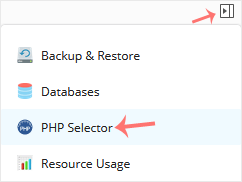
plesk-cl-php-selector-menu.gif


For Single Domain or All Domains:

If you have one domain, use this method. If you have multiple domains, changing the version in Global Settings will update the PHP version for all domains.


1. Under Account Global Settings, choose your PHP version from the drop-down menu next to PHP version.
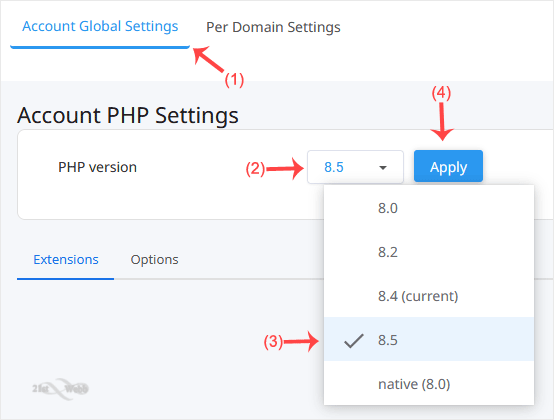
cl-global-php-set.gif

2. Click Apply.


For Per Domain:

This method is used to change the PHP version per domain, but it cannot be used if you have only one domain. .


1. Click on the Per Domain Settings tab.
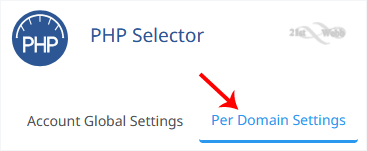
cl-per-domain-settings-tab.gif


2. In the PHP column next to your domain, click the drop-down menu and select the PHP version you want to use.
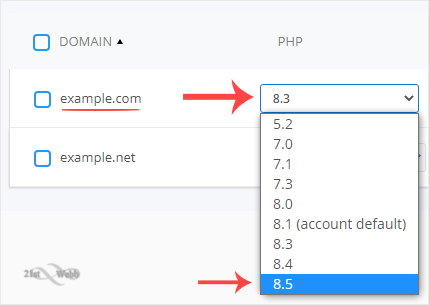
cp-cl-current-php-version-option.gif


You have successfully changed your PHP version using the CloudLinux Selector in Plesk.

  • 0 Users Found This Useful
Was this answer helpful?

Related Articles

How to Enable ionCube Loader Using CloudLinux Selector in Plesk

You can use CloudLinux Selector to enable ionCube Loader in Plesk.   1. Log in to your Plesk...

How to Enable the GD Extension of PHP Using CloudLinux Selector in Plesk

You can use CloudLinux Selector to enable GD extension in PHP via Plesk.   1. Log in to your...

How to Enable the Mailparse Extension of PHP Using CloudLinux Selector in Plesk

You can use CloudLinux Selector to enable the Mailparse extension in PHP via Plesk.   1. Log in...

How to Enable or Disable PHP Extensions Using the CloudLinux Selector in Plesk

You can use CloudLinux Selector to enable or disable available PHP extensions in Plesk.   1....

How to Enable or Disable PHP's allow_url_fopen Using CloudLinux Selector in Plesk

You can use CloudLinux Selector to enable or disable the allow_url_fopen directive in Plesk....

Powered by WHMCompleteSolution