
How to Download a Dump of a Database in Plesk

You can generate a backup of your database and download it to your computer using Plesk.


1. Log in to your Plesk account.

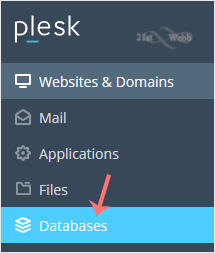
2. Click on Databases from the Sidebar Menu.
plesk-database-menu.gif


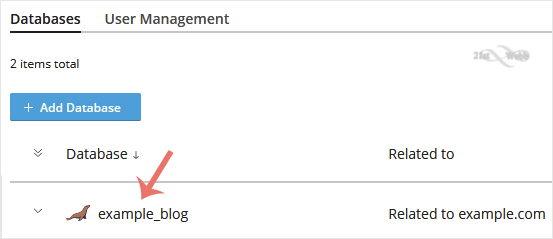
3. Choose the database you want to download from the list of databases.
plesk-database-list.gif


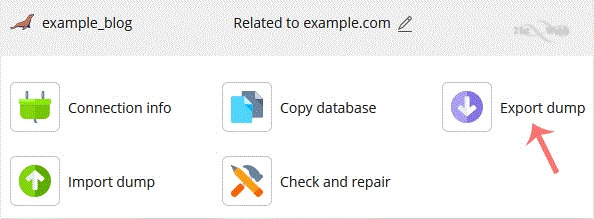
4. Proceed with Export Dump, and a popup box will appear.
plesk-export-database.gif


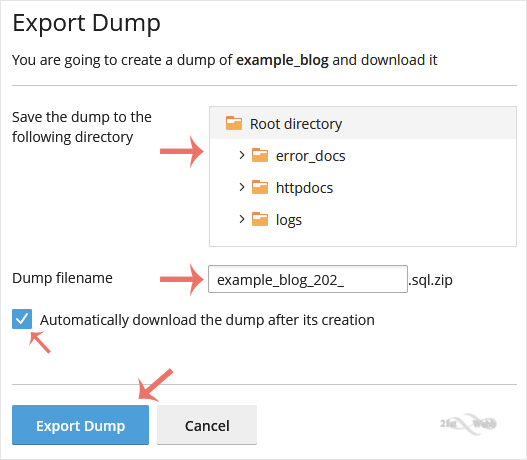
5. Choose the directory where your database dump will be saved. Checkmark Automatically download the dump after its creation, and confirm with Export Dump.
plesk-database-export-dump.gif


Once the database dump is generated, your browser will prompt you to download it. If not, click Download.

  • 0 Users Found This Useful
Was this answer helpful?

Related Articles

How to Create a Database in Plesk

You can create a database in Plesk by following this tutorial.   1. Log in to your Plesk...

How to Delete a Database in Plesk

In this tutorial, you will learn how to delete a database in Plesk. This is helpful when the...

How to Create a New Database User in Plesk

In this tutorial, you will learn how to create a new database user in Plesk.   1. Log in to...

How to Remove a Database User in Plesk

In this tutorial, you will learn how to remove a database user in Plesk.   1. Log in to your...

Powered by WHMCompleteSolution