
How to Limit Bandwidth Usage of cPanel User From WHM

Do you want to increase or limit cPanel user's bandwidth usage? A WHM user can modify the bandwidth of a cPanel account, and a root user can modify WHM and cPanel users.


1. Log in to your WHM Account.


2. Go to Account Functions >> Limit Bandwidth Usage or type Limit in the menu filter box. The option will appear. Click on it.
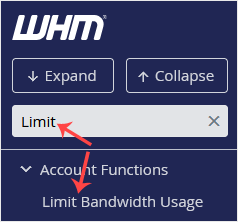
whm-reseller-limit-bandwidth-sidebar.gif


3. In the Search Box, type the cPanel username or select a user from the drop-down list. Then click on Limit.
whm-reseller-limit-bandwidth-select.gif


4. Under Bandwidth Limit, select the Unlimited option for unmetered bandwidth or type a value in the field box and click on Change.
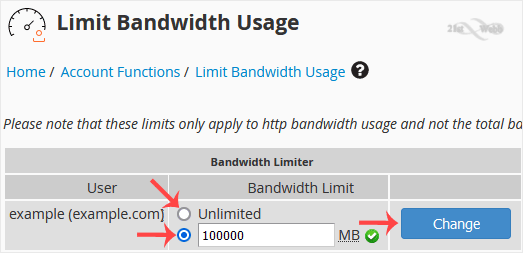
whm-reseller-limit-bandwidth-modify.gif


Congratulations. You have successfully modified the bandwidth of the selected user.

  • 0 Users Found This Useful
Was this answer helpful?

Related Articles

How to Set Custom/Private Nameservers in WHM

You can set up custom/private nameservers from WHM. 1. Log in to WHM Account. 2. Go to Server...

How to Edit a Hosting Package in WHM

You can edit the hosting package of your account. With root access, you can edit the packages of...

How to Create a Feature List in WHM

You can create a feature list from your WHM Account. Feature lists allow you to provide a...

How to Remove a Feature List from WHM

Follow this tutorial if you have a feature list you don't need and want it removed. 1. Log in to...

How to Force cPanel Users to Change Their Passwords Using WHM

Do you want to force cPanel users to change their passwords after login? If so, follow this...

Powered by WHMCompleteSolution