
How to Enable/Disable Features of cPanel Account From WHM

You can enable/disable features of your customers' cPanel account from WHM. Follow this tutorial if you do not want to provide access to PHP Setting, SSL, or anything else.


1. Log in to your WHM Account.


2. Go to Packages >> Feature Manager or type Feature Manager in the menu filter box. The option will appear. Click on it.
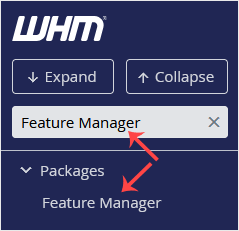
whm-reseller-feature-manager-menu.gif


3. Under the Feature Manager list, choose your feature list from the drop-down menu and then click on Edit.
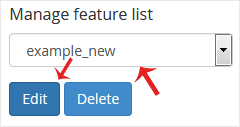
whm-reseller-featuremanager-edit-menu.gif


4. To enable any feature, check-mark the feature you wish to enable. For disabling, uncheck the feature you want to disable and then click on Save.
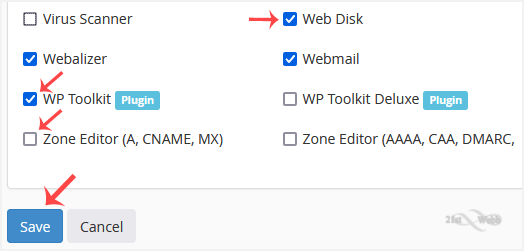
whm-reseller-featuremanager-modify-list.gif


Using WHM feature lists makes it easy to control access and keep the cPanel experience simple.

  • 0 Users Found This Useful
Was this answer helpful?

Related Articles

How to Set Custom/Private Nameservers in WHM

You can set up custom/private nameservers from WHM. 1. Log in to WHM Account. 2. Go to Server...

How to Edit a Hosting Package in WHM

You can edit the hosting package of your account. With root access, you can edit the packages of...

How to Create a Feature List in WHM

You can create a feature list from your WHM Account. Feature lists allow you to provide a...

How to Remove a Feature List from WHM

Follow this tutorial if you have a feature list you don't need and want it removed. 1. Log in to...

How to Force cPanel Users to Change Their Passwords Using WHM

Do you want to force cPanel users to change their passwords after login? If so, follow this...

Powered by WHMCompleteSolution