
How to Edit or Remove CNAME Record in cPanel


You can edit or remove CNAME Record from cPanel using the cPanel's DNS Zone Editor. It allows you to manage, remove, or modify DNS records.


1. Log in to your cPanel account.


2. In the Domains section, click on Zone Editor.

cpanel-dnszone-icon.gif

3. Under Domains, you can see many options below Actions.
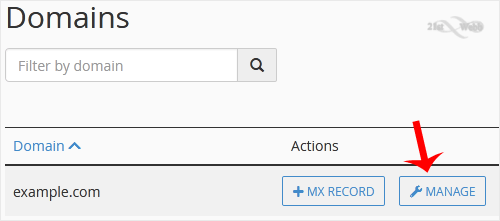


4. Click on Manage.

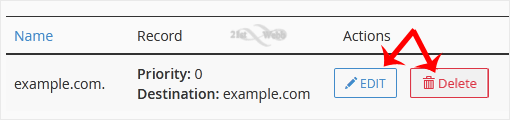
5. Locate the CNAME Record you want to edit or remove. Should you wish to edit a CNAME record, click on Edit. Modify the details, and click on Save Record. Removing a record can be done with Delete option.


Note: It may take anywhere from 12 to 24 hours for the changes to take effect worldwide.

  • 0 Users Found This Useful
Was this answer helpful?

Related Articles

How to Reset cPanel's Account Password

If you have access to your cPanel account, follow these steps to reset your password: 1. Log in...

How to Change the PHP Version on Your Domain in cPanel

Some software requires a different version of PHP. You can switch the PHP versions using cPanel....

How to Reset the PHP Version to the Default Version in cPanel

If you want to reset the PHP version to the default version, follow these instructions:1. Log in...

How to Set the PHP Version per Domain in cPanel

In this article, we will demonstrate how to use cPanel to set different PHP versions for...

How to Set the PHP Version per Directory in cPanel

Do you want to use different PHP versions per directory? You can do this using cPanel and the dot...

Powered by WHMCompleteSolution