
How to Edit a File in the cPanel File Manager

You can use cPanel's built-in file manager to edit files on your website.


1. Log in to your cPanel account.


2. In the Files section, click on File Manager.


3. Navigate to the directory where your file is located.

4. Right-click on the file. Then click on Edit or HTML Edit in the Context Menu.


5. In the HTML Editor window, click on Edit.


6. Make changes to the file, then click the Save icon.
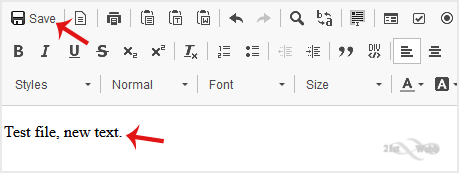
 

Your file has been successfully edited.

  • 0 Users Found This Useful
Was this answer helpful?

Related Articles

How to Reset cPanel's Account Password

If you have access to your cPanel account, follow these steps to reset your password: 1. Log in...

How to Change the PHP Version on Your Domain in cPanel

Some software requires a different version of PHP. You can switch the PHP versions using cPanel....

How to Reset the PHP Version to the Default Version in cPanel

If you want to reset the PHP version to the default version, follow these instructions:1. Log in...

How to Set the PHP Version per Domain in cPanel

In this article, we will demonstrate how to use cPanel to set different PHP versions for...

How to Set the PHP Version per Directory in cPanel

Do you want to use different PHP versions per directory? You can do this using cPanel and the dot...

Powered by WHMCompleteSolution